LLM module — #: <prompt> for shell-command generation
- Quickstart
- OSC 133 — required for dialog / auto modes
- How a prompt flows
- Endpoint resolution (HTTP provider)
- Context injection
- Transparent failure — error notifications
- Live signals while typing
- History integration
- Chat surfaces
- Keybindings
- Configuration reference
- Security notes
- Shutdown semantics
Type #: list all .zig files modified in the last week at the
shell prompt and press Alt+A. atty wipes the typed line and
injects the LLM-generated command into the readline buffer. You
hit Enter to actually run it (or edit it / Ctrl+C to discard).
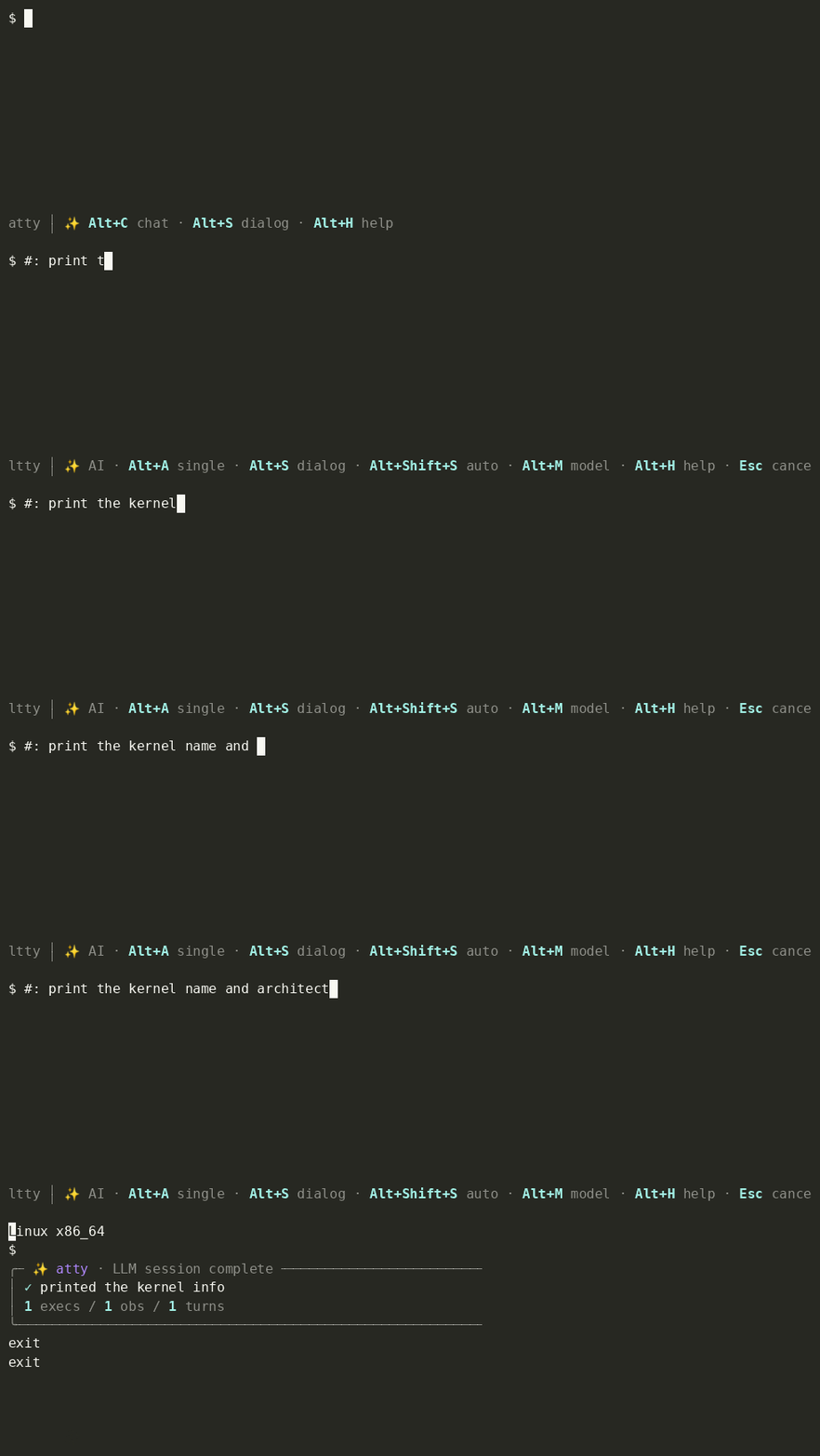
Three action keys, each with its own follow-up flow:
| Key | Mode |
|---|---|
Alt+A |
single command, no follow-up |
Alt+S |
multi-turn dialog with OSC 133 capture |
Alt+Shift+S |
dialog + auto-submit each step |
Why not
Enter? Pressing Enter on#: …is a no-op by default (enter_action = .none) — defense against accidental LLM calls when you just want to type a comment. SetConfig.enter_action = .single(or.dialog/.auto) to bring back the pre-Alt-key trigger flow if you preferred it.
Alt+A single rewrite · inline chat panel collapsing exec output · Alt+R recall picker showing the first user line of each persisted dialog.
Quickstart
Add the module to your src/config.zig tuple and rebuild:
const atty = @import("atty");

pub const modules = .{
    atty.modules.guardrail.configure(.{}),
    atty.modules.atuin.configure(.{}),
    atty.modules.history.configure(.{}),
    atty.modules.llm.configure(.{
        .provider = .{ .http = .{ .api_base = "http://localhost:11434/v1" } },
        .model = "qwen3-coder",
    }),
};
That’s enough for a local Ollama install — the module short- circuits to inert mode (no worker thread spawned) when no endpoint is configured, so the rest of your shell experience is untouched.
Or use Claude Code (claude -p)
If you have the Claude Code CLI installed and authenticated, swap the HTTP provider for a subprocess provider — atty shells out per request, the CLI handles auth out of its own login state, no env vars to wire.
The fastest path is a preset:
.provider = atty.modules.llm.providers.claude_sonnet_4_6,
Available preset constants (all under atty.modules.llm.providers):
| Preset | Notes |
|---|---|
claude_sonnet_4_5 |
Sonnet 4.5 — solid default for shell-command work. |
claude_sonnet_4_6 |
Sonnet 4.6 — the current Sonnet recommended for most agent flows. |
claude_opus_4_7 |
Opus 4.7 — biggest model. Slower + pricier, best for hairy prompts. |
claude_haiku_4_5 |
Haiku 4.5 — small + cheap. Fast single-line #: flow. |
claude_default |
Let the CLI pick whichever model your claude config selected. |
gemini_2_5_pro |
Gemini 2.5 Pro via the gemini CLI — biggest Gemini, best for chat / hairy prompts. |
gemini_2_5_flash |
Gemini 2.5 Flash via the gemini CLI — fast + cheap, good for single-line #: work. |
openai |
Hosted OpenAI (https://api.openai.com/v1, reads $OPENAI_API_KEY). Pair with Config.model = "gpt-4o-mini" or similar. |
ollama |
Local Ollama on localhost:11434 — same as the default HTTP behavior, exposed as a constant for symmetry. |
For something the presets don’t cover, drop down to the factory:
.provider = atty.modules.llm.providers.claudeCode(.{
    .model = "claude-sonnet-4-6",
    .extra_argv = &.{ "--permission-mode", "acceptEdits" },
}),
The factory is shorthand for:
.provider = .{ .subprocess = .{
    .argv = &.{ "claude", "-p", "--output-format", "json", "--model", "claude-sonnet-4-6" },
    .prompt_via = .final_arg,
    .output = .{ .json_field = "result" },
    .timeout_ms = 60_000,
}},
For the Gemini CLI there’s a matching factory:
.provider = atty.modules.llm.providers.geminiCli(.{
    .model = "gemini-2.5-pro",
}),
shorthand for:
.provider = .{ .subprocess = .{
    .argv = &.{ "gemini", "--skip-trust", "-m", "gemini-2.5-pro", "-o", "text", "-p" },
    .prompt_via = .final_arg,
    .output = .raw,
    .timeout_ms = 60_000,
}},
Gotcha — --skip-trust is mandatory. The gemini CLI refuses
headless (-p) runs in an untrusted workspace, and atty invokes it in
the shell’s cwd. The factory bakes --skip-trust in so calls don’t
fail with the trust error (alternatively set
GEMINI_CLI_TRUST_WORKSPACE=true in the env). Note the tradeoff: this
auto-trusts the current directory for that run, so gemini’s own
tool-calls execute there without a confirmation prompt. Auth stays in
your gemini login; atty never sees tokens.
Any prompt-in / text-out CLI follows the same pattern. For simonw/llm:
.provider = .{ .subprocess = .{
    .argv = &.{ "llm", "-m", "gpt-4o-mini" },
    .prompt_via = .stdin,
    .output = .raw,
}},
OSC 133 — required for dialog / auto modes
Dialog (Alt+S) and auto (Alt+Shift+S) modes need OSC 133
prompt markers so atty knows where command output begins / ends.
Single mode (Alt+A) works without them.
# in your ~/.bashrc:
eval "$(atty init bash)"

# or ~/.zshrc:
eval "$(atty init zsh)"
Gotcha — .bashrc is load-bearing. The init snippet does
exec atty bash at the top to re-launch your shell under atty.
exec replaces the current shell, so any function
definitions / PROMPT_COMMAND wiring the snippet ALSO sets are
discarded along with it. The canonical flow expects the new atty
bash to re-read .bashrc (interactive shells do), which re-runs
the eval; this time ATTY=1 skips the exec and the OSC 133
setup applies in-place.
If you run eval "$(atty init bash)" manually from a fresh
shell without it in your rc, the new atty session won’t have
OSC 133 hooks — you’ll see the exec mode needs OSC 133 error
on Alt+S. Two fixes:
- Add the eval line to
.bashrc(canonical), OR - After landing in the atty session, run
eval "$(atty init
bash)"
a second time —ATTY=1is now set, exec gets skipped, OSC 133 setup runs in your current shell.
Sanity-check with eval "$(atty doctor)" — colour-coded
pass/fail for every step of the integration chain.
How a prompt flows
- You type
#: list zig filesthen pressAlt+A. onActionin the module sees thellm_exec_singleaction, checksai_mode_active(line starts with#:), and queues\x15(Ctrl+U) onpending_injection. The proxy drains that to the shell on the nextpollShellInputtick, wiping the typed#: …text. (SettingConfig.enter_action = .singlere-binds the legacy#:<Enter>trigger to the same code path — same result, different entry point.)- A worker thread wakes on a condvar, POSTs to
${api_base}/chat/completionswith the prompt body, parses thechoices[0].message.contentfrom the response. pollShellInputon the next tick surfaces the parsed command bytes. The proxy writes them topty.masteras if you’d typed them; readline echoes; you see the suggested command at the prompt.- You review + hit Enter (or edit, or Ctrl+C to discard). Normal shell behaviour from here on — the LLM module is out of the way.
When with_explanation = true (the default), the model also
emits a one-sentence summary of what the command does; atty
parses it out of the response and shows it in the statusbar’s
hint row above the prompt.
Endpoint resolution (HTTP provider)
When Config.provider is .{ .http = ... } (the default), the
endpoint is discovered in this priority order — first non-empty wins:
Config.provider.http.api_base(static, baked into yourconfig.zig)$LLM_API_BASE(env var; name configurable viaConfig.provider.http.api_base_env)$OLLAMA_HOST(Ollama-native fallback;/v1is suffixed automatically if absent — Ollama’s/v1/*mirror is OpenAI-compatible while its native API isn’t)
The static form is the most robust because it doesn’t depend on
shell-env state at fork time — a misconfigured .bashrc or a
launcher that strips env can leave the env-var paths silently
inert. With the static form, the endpoint is whatever your
compiled binary says it is.
Authentication: $LLM_API_KEY (name configurable via
Config.provider.http.api_key_env) becomes a Bearer <key>
header when set. Empty / unset → no Authorization header sent.
When Config.provider is .{ .subprocess = ... }, none of the
above applies — the CLI tool handles its own endpoint and auth.
atty just spawns it per request.
Trailing slashes are normalised on all three paths so
http://localhost:11434/v1/ and http://localhost:11434/v1 both
resolve cleanly.
Context injection
Config.context_env_vars exposes additional env vars to the
model alongside the prompt. Each named var is read at attach time
and (if set, non-empty) joined into a one-line context block
appended to the user message:
atty.modules.llm.configure(.{
    .context_env_vars = &.{ "PATH_BASE", "PROJECT" },
}),
The model sees:
Generate a bash command to: list zig files

Context: PATH_BASE=/opt/foo, PROJECT=acme
Empty / unset env vars are skipped. The whole Context: line is
omitted when none of the named vars are set, so you don’t get an
empty context dangling on the prompt.
CWD / git-root context isn’t implemented yet — both need
child-PID tracking via /proc/<shell_pid>/cwd (or OSC 7) to
follow the shell as the user cds, which is a separate piece of
infrastructure.
Transparent failure — error notifications
Silent failure on a typed prompt is the worst possible UX — the
line vanishes and the user doesn’t know whether the model is
slow, the endpoint is down, or atty was never going to handle it.
Every failure path latches an error notification (muted red +
⚠ glyph, above the status bar):
| Latched message | Cause |
|---|---|
no endpoint set — export $LLM_API_BASE or … |
Module attached but api_base resolved empty. Synchronous, fires on onInput. |
request failed (endpoint unreachable?) |
client.fetch errored — DNS, connect refused, network unreachable. |
HTTP <status> |
Endpoint responded with non-2xx. 404 commonly means the configured model name doesn’t match anything served. |
couldn't extract a command from the response |
HTTP 200 but no recognized fenced action — the model returned only prose with no exec / `question /`done fence. In chat surfaces atty falls through and renders the prose as an assistant turn; in single / dialog / auto modes that text becomes the done` reason. |
Config.statusbar.error_ttl_ms controls how long the
notification stays visible (60 s default). The hint slot (used
for explanations) is suppressed while an error is active and
resurfaces once the error TTL expires.
Live signals while typing
While you’re mid-typing a #: … prompt — before you hit Enter —
atty already knows the LLM is the route. Two signals fire on the
prefix match:
- Cursor colour (
prefix_signal_cursor,prefix_signal_cursor_color): on the edge into match, atty emits OSC 12 to set the terminal cursor to the configured colour (cyan by default). On the edge out (backspace past the prefix, or line cleared after Enter), OSC 112 resets to default. All modern terminals honour OSC 12 / 112 — Ghostty, kitty, iTerm, WezTerm, VS Code. - Status segment (
prefix_signal_status,prefix_signal_status_text): the module’sstatusTextreturns✨ prompt(configurable) in the bottom status bar while the prefix matches. Suppressed during an in-flight request — the🧠 thinking…indicator takes precedence.
Both are opt-out — set the bool config to false to disable.
History integration
Because onInput returns .replace_commit (not plain
.replace), the proxy fires dispatchLineCommit on the typed
#: list zig files line. atuin and the bundled history module
both record it. Next time you start typing #: l…, ghost-suggest
surfaces your prior prompts the same way it surfaces any normal
command — Right / End / Ctrl+F to accept, multi-row pick list if
configured. Ctrl+Shift+D’s delete_history_match works on the
prompt too.
Chat surfaces
Two parallel UIs render the same conversation ring — pick the one that fits the moment.
Alt+C— inline chat panel. Reserves N rows above the statusbar (default 10) for a slim chat strip. The shell stays visible above the panel; cursor focus moves into the panel’s input row. For casual back-and-forth while still watching command output scroll above.Ctrl+Alt+Up/Downgrows/shrinks the panel one row at a time;Shift+Enterinserts a newline in the input (multi-line prompts);Ctrl+Endsnaps the view back to the live tail after a PageUp.Alt+Shift+C— full chat overlay. Takes over the screen via alt-screen swap. Bigger view of the conversation history, structured assistant rendering, more room. For focused review of long sessions.
Both share the same turns[] ring + dialog state, and both dispatch as .dialog (or .auto if Alt+T toggled auto-exec while the panel is open) so a exec ``` fenced action returned while either surface is open injects the suggested command at the user’s shell prompt. The two surfaces are mutually exclusive — opening one closes the other so cursor focus is unambiguous.
Chat turn rendering:
- Markdown styling —
**bold**renders as SGR bold,`code`as cyan. Seesrc/modules/llm/md_render.zig. - Hard line breaks —
\nin the LLM’s reply preserves as a panel row break (was previously flattened to space). - UTF-8 / wide chars — codepoint-aware truncation via
src/modules/llm/paint_width.zig; emoji + CJK bill the right number of columns. - Word wrap — long turns wrap at the last space inside the column budget; the OLDEST visible turn gets clipped first so the newest reply stays anchored at the bottom.
doneaction in chat — pushes the reason as an assistant turn (no conclusion banner, no dialog close); the conversation stays open. Outside chat surfaces,donestill emits the conclusion banner and ends the loop.
Keybindings
Press Alt+H any time to scroll the full cheat-sheet into shell history. The shipped LLM bindings (registered on the module via default_bindings, so they only fire when the LLM module is enabled):
| Key | Action |
|---|---|
Alt+A |
Single-shot prompt (one command, no dialog). |
Alt+S |
Dialog mode (multi-turn exec/observe loop). |
Alt+Shift+S |
Auto-exec (dialog + auto-confirm each step). |
Alt+M |
Cycle through config.providers[] entries matching the current dispatch mode. Fires inside chat surfaces too. |
Alt+C |
Toggle inline chat panel. |
Alt+Shift+C |
Toggle full-screen chat overlay. |
Alt+T |
(chat only) Toggle auto-exec inside a chat surface. |
Alt+H |
Show this cheat-sheet (LLM-mode hint when in #: ). |
Alt+Shift+R |
(chat) Recall a past dialog — loads the selected session straight into the panel. |
Alt+r |
(chat) Resend the last prompt — retry after a failure, or regenerate after an answer. |
Ctrl+Shift+X |
Cancel any active exec / dialog / auto. |
Ctrl+Alt+Up |
(chat only) Grow inline chat panel by one row. |
Ctrl+Alt+Down |
(chat only) Shrink inline chat panel by one row. |
Shift+Enter |
(chat input) Insert newline instead of submitting. |
Shift+Up / Shift+Down |
(chat only) Scroll chat history one row back/forward. |
PageUp / PageDown |
(chat only) Scroll chat history one page back/forward. |
Ctrl+End |
(chat only) Snap chat view to the live tail. |
Override any of these by listing a different bytes for the same action in Keymap.bindings — the user list wins via first-match.
Configuration reference
Core
| Field | Default | What it does |
|---|---|---|
prefix |
"#: " |
Trigger. # is a shell comment so missed dispatches are silent no-ops, not executed. |
shell |
null |
Shell name for the user-prompt template. null → basename of $SHELL. |
provider |
.{ .http = .{} } |
Single-provider shorthand. Used when providers is empty. See below for variants. |
providers |
&.{} |
Per-mode provider array. When non-empty, takes precedence over provider. First entry whose for_modes.matches(current_mode) wins. Alt+M cycles among cycleable entries that match the current mode. See “Per-mode dispatch” below. |
with_explanation |
true |
Ask model for an explanation + fenced command; show explanation in the hint row. |
system_prompt |
"" |
Extra domain context APPENDED after atty’s fenced-action prompt for single-shot mode (Alt+A). atty always prepends its own protocol prompt — see src/modules/llm/prompts/single.md. |
dialog_system_prompt |
"" |
Extra domain context APPENDED after atty’s fenced-action prompt for dialog/auto/chat modes. atty’s protocol prompts live in src/modules/llm/prompts/{dialog,auto}.md. |
context_env_vars |
&.{ "EDITOR", "VISUAL", "LANG", "TERM", "TZ" } |
Env vars whose values get appended to the user message as Context: KEY=value, …. Defaults are identity-free shell-task essentials. Never list credential-shaped names (*_API_KEY, *_TOKEN, AWS_*, etc.); values transmit verbatim to the LLM endpoint. Set to &.{} to disable. |
enter_action |
.none |
What Enter on #: … does. .none (default), .single, .dialog, .auto. |
auto_delay_ms |
800 |
Auto-exec confirm delay (ms) for Alt+Shift+S. Any keystroke aborts. |
history_turns_max |
8 |
Ring capacity. The model sees at most this many recent turns per request. |
dialog_parse_retry_max |
2 |
How many times atty re-prompts the model when no recognized fenced action is found in the response (rare with the fenced-action protocol — most responses degrade gracefully to done + reason without a retry). |
Provider — HTTP variant fields
Available as Config.provider.http.<field> (or on each
ProviderEntry.config.http.<field> when using the array form):
| Field | Default | What it does |
|---|---|---|
model |
"llama3:8b" |
Model identifier sent in the request body’s "model" field. |
api_base |
"" |
Static endpoint URL. Wins over env vars when non-empty. |
api_base_env |
"LLM_API_BASE" |
Env-var name for the primary endpoint. |
api_base_fallback_env |
"OLLAMA_HOST" |
Env-var name for the Ollama-native fallback (/v1 auto-suffixed). |
api_key_env |
"LLM_API_KEY" |
Env-var name for the optional Authorization: Bearer … token. |
prompt_ext |
"" |
Text appended to atty’s mode prompt for this provider (same as the subprocess field below). Empty for the openai/ollama presets — plain HTTP models have no built-in tools to steer away from — but settable if you want per-model prompt steering. |
Per-mode dispatch (providers[])
When Config.providers is non-empty it replaces the single-
shorthand Config.provider. Each entry binds a Provider to a
set of dispatch modes (single / dialog / auto / chat)
and a cycle flag. Worker dispatch picks the first entry whose
for_modes.matches(current_mode) is true.
Motivating case — haiku for one-shots, sonnet for dialog:
.providers = &.{
    .{ .name = "haiku",  .config = atty.modules.llm.providers.claude_haiku_4_5,  .for_modes = .single_only },
    .{ .name = "sonnet", .config = atty.modules.llm.providers.claude_sonnet_4_6, .for_modes = .dialog_only },
},
ProviderEntry fields:
| Field | Default | What it does |
|---|---|---|
name |
"" |
Statusbar label + Alt+M cycle indicator. Falls back to model id (HTTP) or argv[0] (subprocess) when empty. |
config |
(required) | Transport config — same Provider union as Config.provider. |
for_modes |
.all |
Bitset over dispatch modes. Constants: .all, .single_only, .dialog_only, .dialog_and_auto. |
cycleable |
true |
Whether Alt+M cycles to this entry. Set false for “pinned” entries. |
history_turns_max |
null |
Per-entry override on conversation history depth. null = use Config.history_turns_max. |
Provider — subprocess variant fields
Available as Config.provider.subprocess.<field>:
| Field | Default | What it does |
|---|---|---|
argv |
(required) | Program + leading args. atty appends the rendered prompt as the final argv slot (default). |
prompt_via |
.final_arg |
.final_arg = append prompt to argv; .stdin = pipe prompt via stdin (close stdin = EOF). |
output |
.raw |
.raw = stdout text IS the response; .{ .json_field = "name" } = parse stdout as JSON, take the named top-level string field; .{ .json_stream = .{ .field = "result" } } = newline-delimited JSON (claude’s --output-format stream-json), skips intermediate system / assistant events and takes the named field from the type="result" line. |
timeout_ms |
30_000 |
Wall-clock timeout in ms. A watchdog thread sends SIGTERM (then SIGKILL after 200 ms grace) when the budget expires. Set to 0 to disable. |
session |
.none |
CLI-side session continuation. .none sends the full rendered conversation each request (works for any CLI). .{ .continuation = .{ .flag = "--resume", .id_field = "session_id" } } captures the session id from the CLI’s stream-json type=system,subtype=init event and reuses it via the named argv flag on subsequent turns. Only meaningful with output = .json_stream. Use providers.claudeCodeStream(.{ .continuation = true }) for the canned claude shape. |
prompt_ext |
"" |
Provider-specific text appended to atty’s resolved mode prompt for requests this provider serves — after the mode’s user extension (cfg.system_prompt in single mode, cfg.dialog_system_prompt in dialog/auto/chat). The geminiCli / claudeCode / claudeCodeStream factories default it to the agentic-CLI guidance — agentic CLIs expose their own run_shell_command / list_directory tools, and this tells the model those don’t work under atty and to route everything through the exec block. Plain HTTP models (openai, ollama) leave it empty. Override per provider: providers.geminiCli(.{ .model = "gemini-2.5-pro", .prompt_ext = "…" }), or "" to drop it. HttpProvider has the same field. |
Why agentic CLIs need this.
gemini/clauderun as autonomous agents with their own filesystem/shell tools. Without the steering text they’ll reach for those tools instead of emitting atty’sexecblock — atty never sees the result and the user can’t confirm it. The presets ship the override on by default so chat/dialog “just works”; a plain prompt→completion model (simonw/llm, OpenAI HTTP) has no such tools and gets no extra text.
Session continuation — trade-offs
With .session = .continuation the CLI owns the conversation
transcript: atty sends only the latest user turn each request
and lets the CLI’s own session state (claude’s --resume <id>)
maintain history. Saves tokens and CLI-side compute (no
re-uploading the transcript every turn) at the cost of:
- Atty still records every turn it sees, so the chat overlay
(Alt+C / Alt+Shift+C) shows the full conversation atty
participated in: user turns the user typed + assistant turns
the CLI replied with. What changes is only the prompt atty
sends to the CLI on each subsequent request — instead of
re-rendering the whole
turns[]ring as one big text body, atty sends only the latest user turn and trusts the CLI’s session state to remember the rest. If the user inspects mid- session they see atty’s full record; the CLI’s view may include side-effects atty never recorded (e.g. tool calls invoked by the CLI itself). - Session id is per-dialog.
Ctrl+Shift+X(cancel) and anyaction: "done"from the model both resetrt.session_id— the next dialog starts a fresh CLI session. atty doesn’t try to persist session ids across atty restarts; thechat_persistfile is atty’s own memory.
Without continuation (default) every request rebuilds the full
prompt from atty’s turns[] ring — atty is the sole memory.
The atty.modules.llm.providers.claudeCode(...) factory returns a
pre-shaped subprocess provider for claude -p --output-format
json. Use providers.claudeCodeStream(...) for the
--output-format stream-json variant — functionally equivalent
today (atty extracts the final result event), but the line-
delimited shape lays the groundwork for paint-side partial-token
streaming when wired up.
Chat surfaces
| Field | Default | What it does |
|---|---|---|
inline_chat_rows |
10 |
Rows the Alt+C inline panel claims above the statusbar. Minimum 3 (comptime-checked). Override at runtime with Ctrl+Alt+Up/Ctrl+Alt+Down — resets to cfg.inline_chat_rows on panel close. |
overlay_open_policy |
.notify |
What to do when the model emits "open_chat": true. .always / .notify / .never. |
Persistence — survive across sessions
Each dialog session writes its own NDJSON file. Files are named YYYYMMDDTHHMMSS-XXXXXX.jsonl (timestamp + 6 hex chars of in-second uniqueness; uniqueness enforced via O_CREAT|O_EXCL retry). Turns append on every pushTurn; the captured conclusion banner is appended as a final {"kind":"conclusion",...} record when the dialog completes (.done → dialogReset rotation), with detach catching the rare mid-dialog-exit case. Incognito sessions (Ctrl+Shift+I) skip the disk path entirely — incognito gates local recording, matching the 🕶 inline-panel indicator.
Migrating from a pre-multi-dialog atty? If your previous build wrote
~/.local/share/atty/chat.jsonl, that file is left untouched but no longer read. The new home is~/.local/state/atty/dialogs/. Move orcatthe old NDJSON into a single dated file under the new directory if you want it surfaced by the (upcoming) recall picker.
| Field | Default | What it does |
|---|---|---|
chat_persist_enabled |
true |
Master switch. Default ON — every chat session leaves an artifact on disk. |
chat_persist_dir |
"" |
Dialog archive directory. Empty + enabled → ${XDG_STATE_HOME}/atty/dialogs/ (fallback ${HOME}/.local/state/atty/dialogs/); directory tree is auto-created (mode 0700). |
Visual signals
| Field | Default | What it does |
|---|---|---|
prefix_signal_cursor |
true |
Emit OSC 12 / 112 cursor-colour transitions while prefix matches. |
prefix_signal_cursor_color |
"cyan" |
OSC 12 colour. Named (cyan) or #RRGGBB / rgb:RR/GG/BB. |
prefix_signal_status |
true |
Show prefix_signal_status_text in the status bar while prefix matches. |
prefix_signal_status_text |
"✨ prompt" |
Status-bar text shown during a prefix match. |
Buffer sizes (tune for big models)
| Field | Default | What it does |
|---|---|---|
timeout_ms |
30_000 |
Stored; not yet wired into client.fetch (deferred to a follow-up). |
max_response_bytes |
4096 |
Cap on the parsed command size. |
max_prompt_bytes |
2048 |
Cap on prompt-body size. Longer inputs ignored as “likely paste, not a task.” |
max_turn_bytes |
4096 |
Cap on the bytes stored per ring entry. Longer turns truncate. |
Model struct (entries in models)
.models = &.{
    .{ .name = "qwen3-coder:30b" },
    .{ .name = "gemma3:4b", .history_turns_max = 3 },  // small-context trim
    .{ .name = "llama3:70b" },
},
| Field | Default | What it does |
|---|---|---|
name |
required | Model identifier sent in the HTTP request body’s "model" field. |
history_turns_max |
null |
Per-model trim — only the last N turns get sent to this model. Useful for mixing a 32k-token coder model with a small 4-bit local model in the same Alt+M cycle. null means “use the full ring.” |
Security notes
- C0 + C1 + DEL controls are stripped from the parsed command
before it touches the PTY. Includes UTF-8-encoded C1 (
0xC20x80..0x9Ffor U+0080..U+009F) — a model that emits CSI (U+009B) followed by a payload would otherwise inject a real terminal escape sequence the user never typed. - CR is dropped specifically in the JSON-escape decode path
and in the sanitiser. Writing
\rto the PTY acts as Enter, so a hostile model that returnedcmd1\rcmd2would have auto-executedcmd1without review. The double-strip is defence in depth. - The prefix is shell-safe.
#: …is a#comment in bash / zsh / sh. If the module is misconfigured or returns no command, the shell silently ignores the typed line — it doesn’t try to execute:as a command-not-found.
Shutdown semantics
The worker thread is t.detach()‘d on atty exit rather than
joined. If the worker is mid-request (slow endpoint, OS TCP
timeout), joining would hang atty’s exit for tens of seconds.
The OS reaps the thread at process exit; the heap allocations
the worker references (Shared / api_base / api_key / shell /
context_blob) are deliberately leaked. Inert-mode runtimes (no
worker spawned)
clean up synchronously since there’s nothing to race against.
A proper timeout on client.fetch is the long-term fix; see
timeout_ms in the config table.